As a partner you get your own promo code. Your audience signs up with it and gets a discount, and you earn a commission on every payment those customers make — first payments and renewals. This page shows exactly how it works, from both sides, screen by screen, and how you track your money.
Screenshots use a fictional partner (“Northwind Investing Club”) and fictional customers. No real customer data is shown. The product itself is in English.
Want your own promo code?
Write to us and tell us a little about your audience (newsletter, channel, community or website). We will set up your code and your partner dashboard together with you.
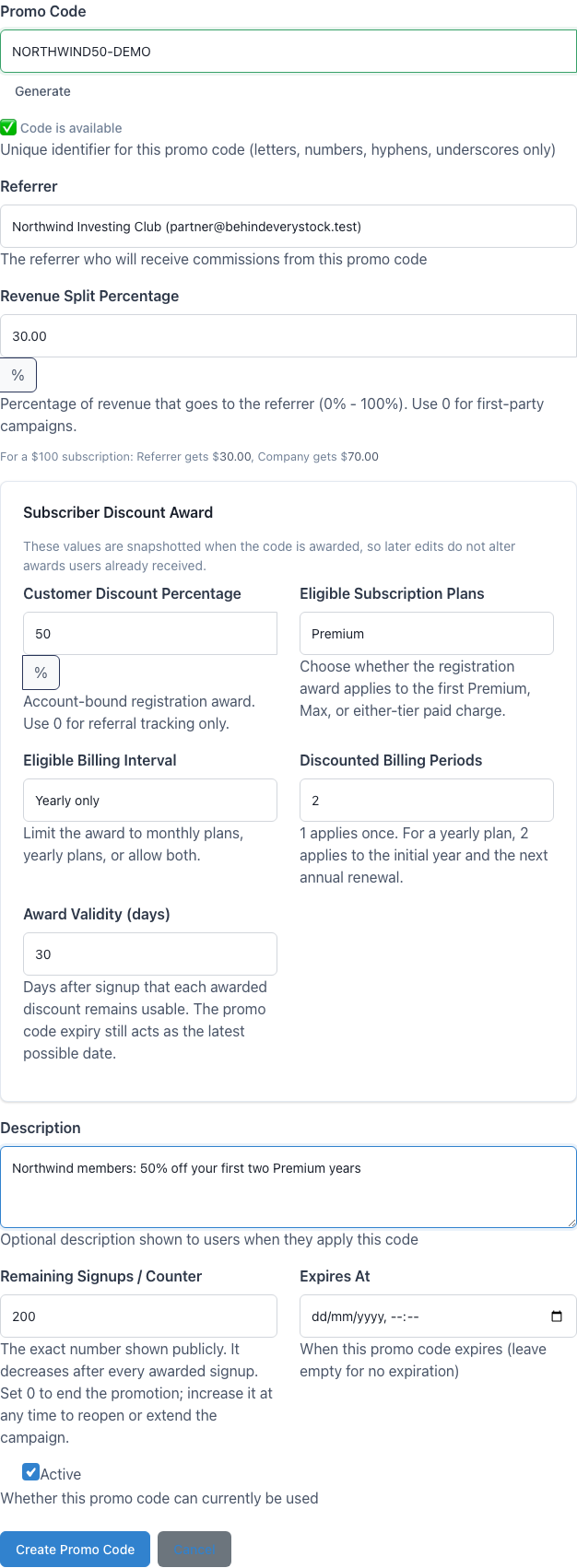
Our partner team creates your code in the admin panel. Together we agree the discount your audience gets, which plans it covers, for how many billing periods, how many people can use it and your commission percentage. Every field is explained in Every option.
Codes are 3–50 characters: capital letters, numbers, “-” and “_”. Lower-case input is converted automatically.
Our teamOur admin form — every option of a code in one place.
2
Sign in to your partner dashboard
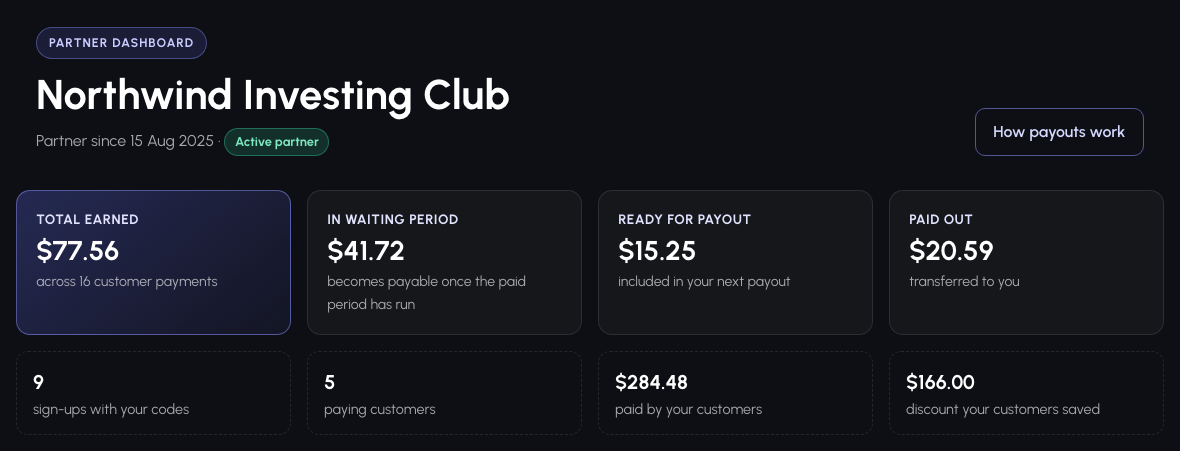
Create a normal account with the same e-mail address we registered for you and verify it. Then open https://behindeverystock.com/partner. The top of the page answers the question that matters most: how much have you earned, and where is that money right now?
Total earned — every commission, except refunded payments.
In waiting period — earned, but the customer's paid period has not run yet.
Ready for payout — confirmed and queued for your next transfer.
Paid out — already transferred to you.
Your earnings at a glance, plus sign-ups, paying customers, what they paid and what they saved.
3
Share your referral link
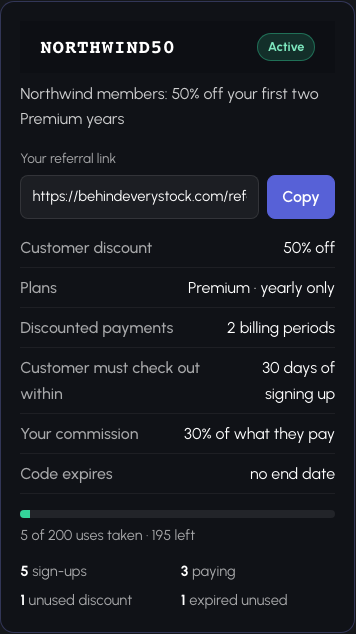
Each code card has a ready-made link with a Copy button. Put it in your newsletter, video description or social post. The card also lists the exact terms of the code, how many uses are left, how many people signed up and how many already pay.
The link works only while the code is Active. A switched-off, expired or used-up code sends visitors to the normal home page.
One card per code: link, terms, usage and results.
4
Watch sign-ups turn into paying customers
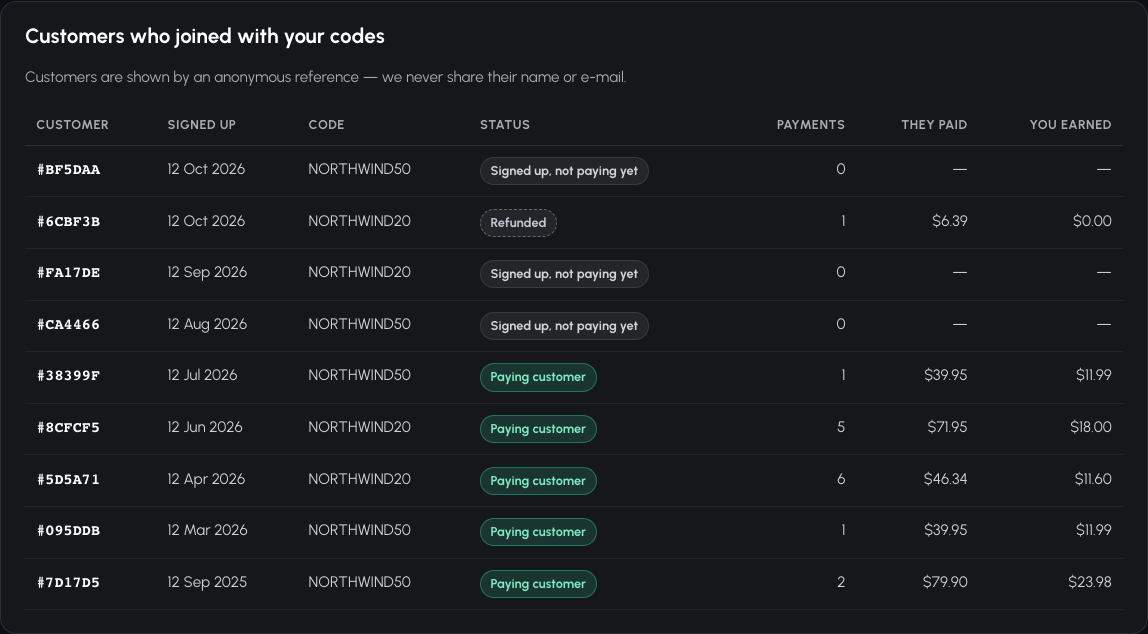
Every account created with your code is listed with the date, the code used and whether that person pays yet. Customers appear as an anonymous reference such as #3F9A1C — we never share names or e-mail addresses — but the reference stays the same, so you can follow one customer over time.
Sign-ups and paying customers from your codes.
5
Check every commission, line by line
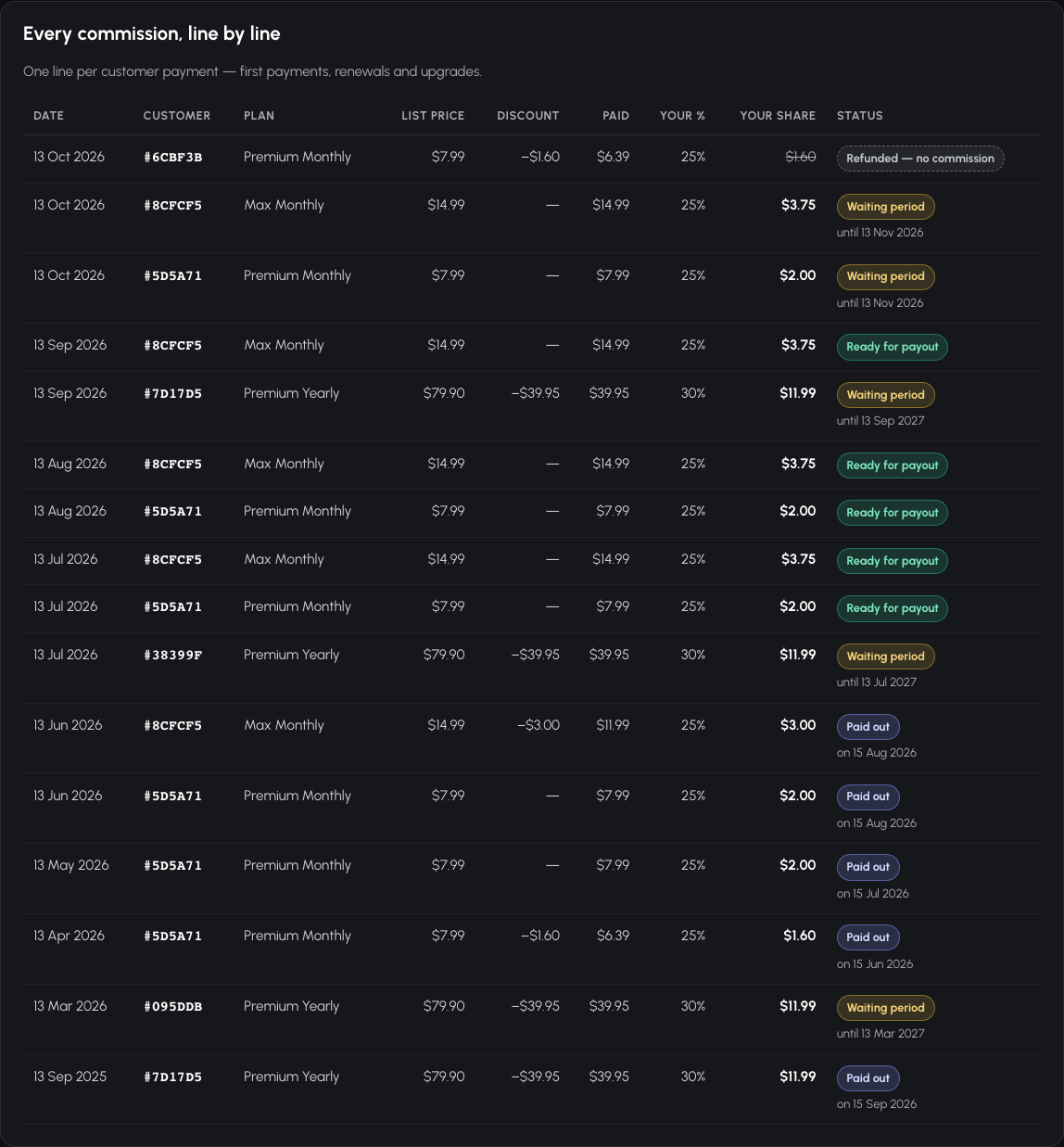
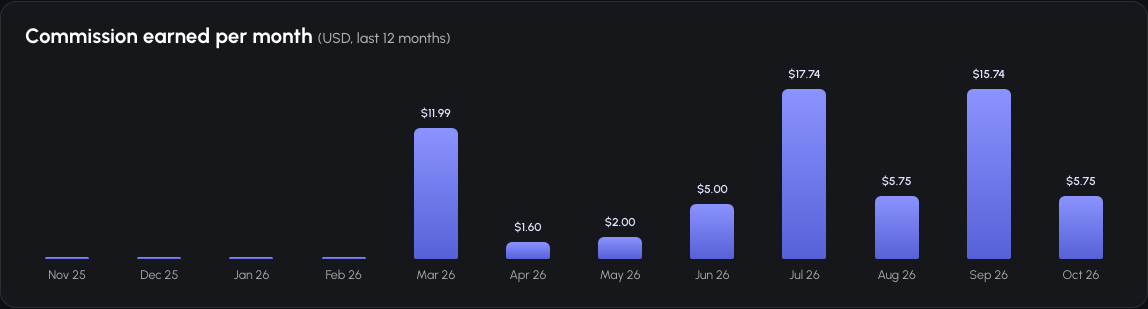
One line per customer payment — first payments, renewals and upgrades. Each line shows the list price, the customer's discount, what they actually paid, your percentage, your share and where that money is. The monthly chart above it adds the lines up per month.
Waiting period with the date it ends.
Ready for payout — confirmed.
Paid out with the transfer date.
Refunded — no commission if the customer got their money back.
Every payment and its commission, with its payout status.
6
Payout — what our team does
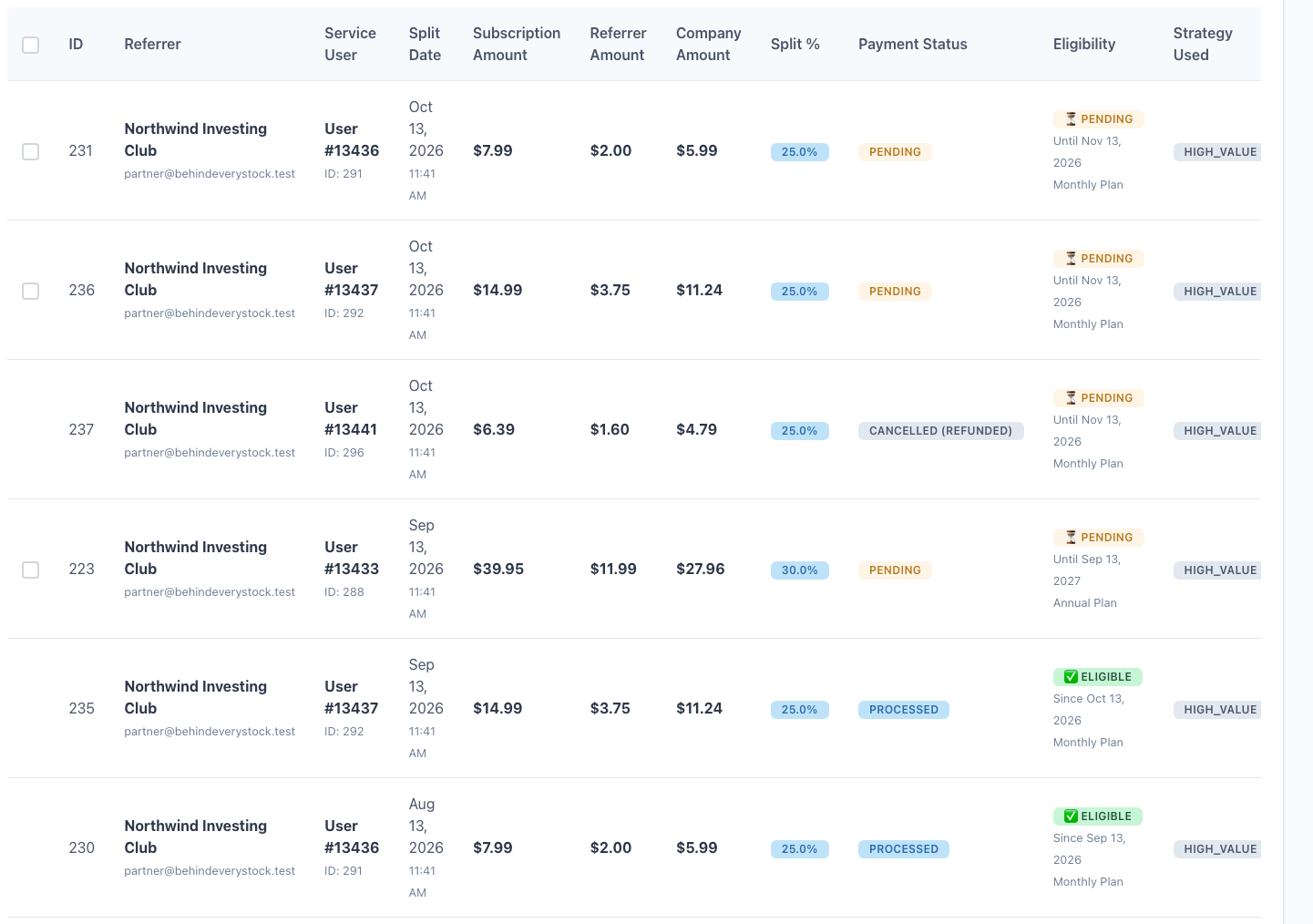
When a commission leaves its waiting period it becomes Ready for payout. Our finance team reviews the ready lines in the admin panel, transfers your money and marks those lines Paid — at that moment they move to Paid out on your dashboard with the date.
Our teamThe same numbers, as our finance team sees them.
Customer (referred user) point of view
From a partner's link to a discounted subscription
1
Open the partner's link
The link opens our home page with a highlighted offer naming the code and what it gives you.
The offer banner from a referral link.
2
Create your account — the code is already filled in
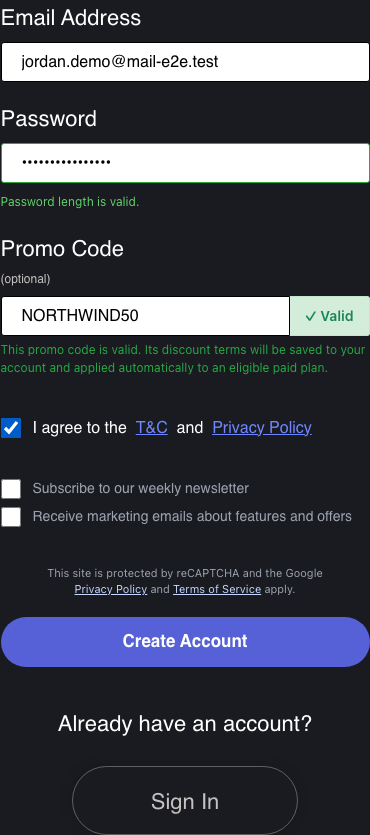
The registration form shows a Promo Code field with the code filled in and a Valid confirmation. Codes can only be entered here, through a partner's link — the normal sign-up page has no promo field, and codes cannot be added to an existing account later.
Sign up with the code attached.
3
Confirm your e-mail
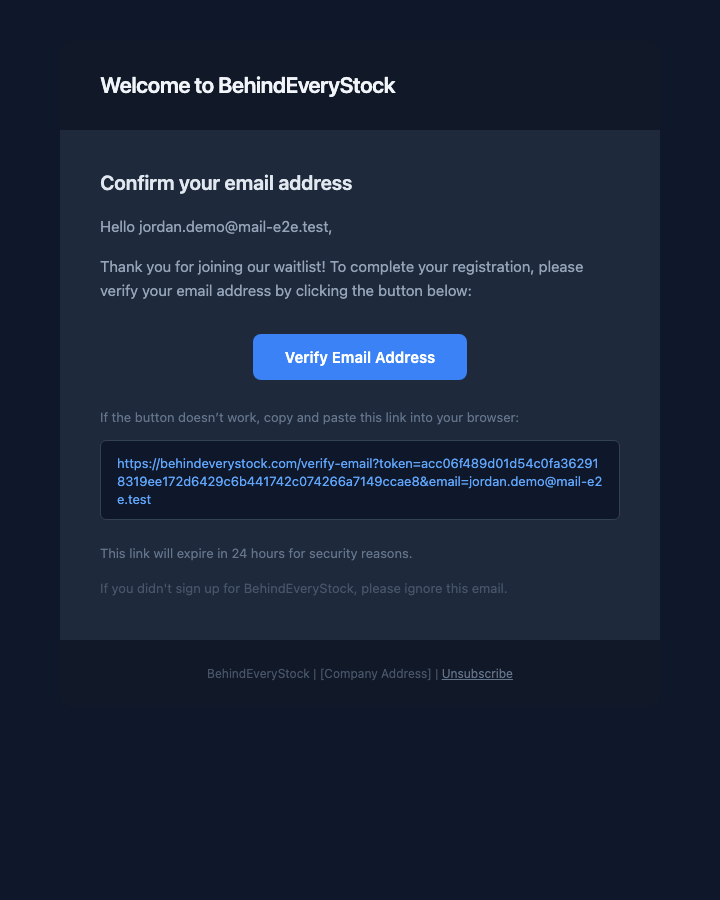
We send a confirmation e-mail. The discount is saved to your account the moment you register; confirming your address unlocks the app.
The confirmation e-mail.
4
See your discount in Profile → Promo Codes
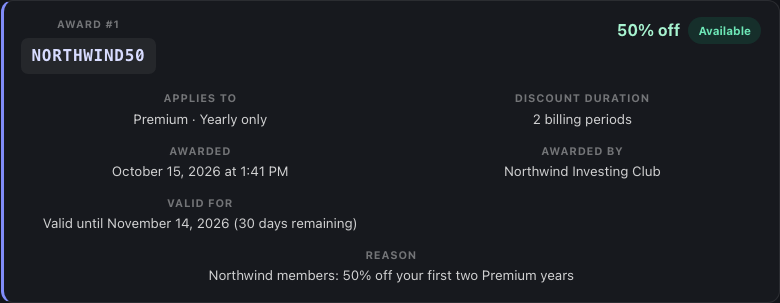
Your saved discount is listed with its percentage, which plans and billing intervals it covers, for how many billing periods it applies, until when you can use it, and its status:
Available, Scheduled (a checkout is open), Used, Expired or, rarely, Revoked (withdrawn for abuse under our Terms).
Your discount, waiting for an eligible plan.
5
Choose an eligible plan
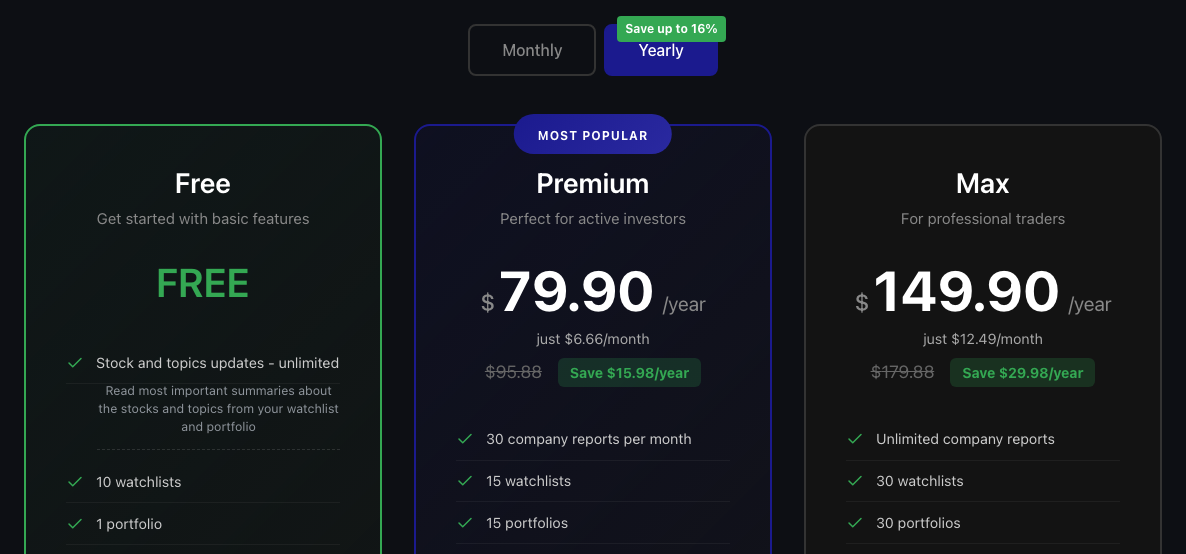
Pick a plan the code covers (for example Premium, yearly). There is nothing to type: the discount is applied for you at checkout. If you change your mind and leave the payment page, your discount stays on your account and comes back with your next checkout.
Pick a plan — the discount follows automatically.
6
Pay the discounted price
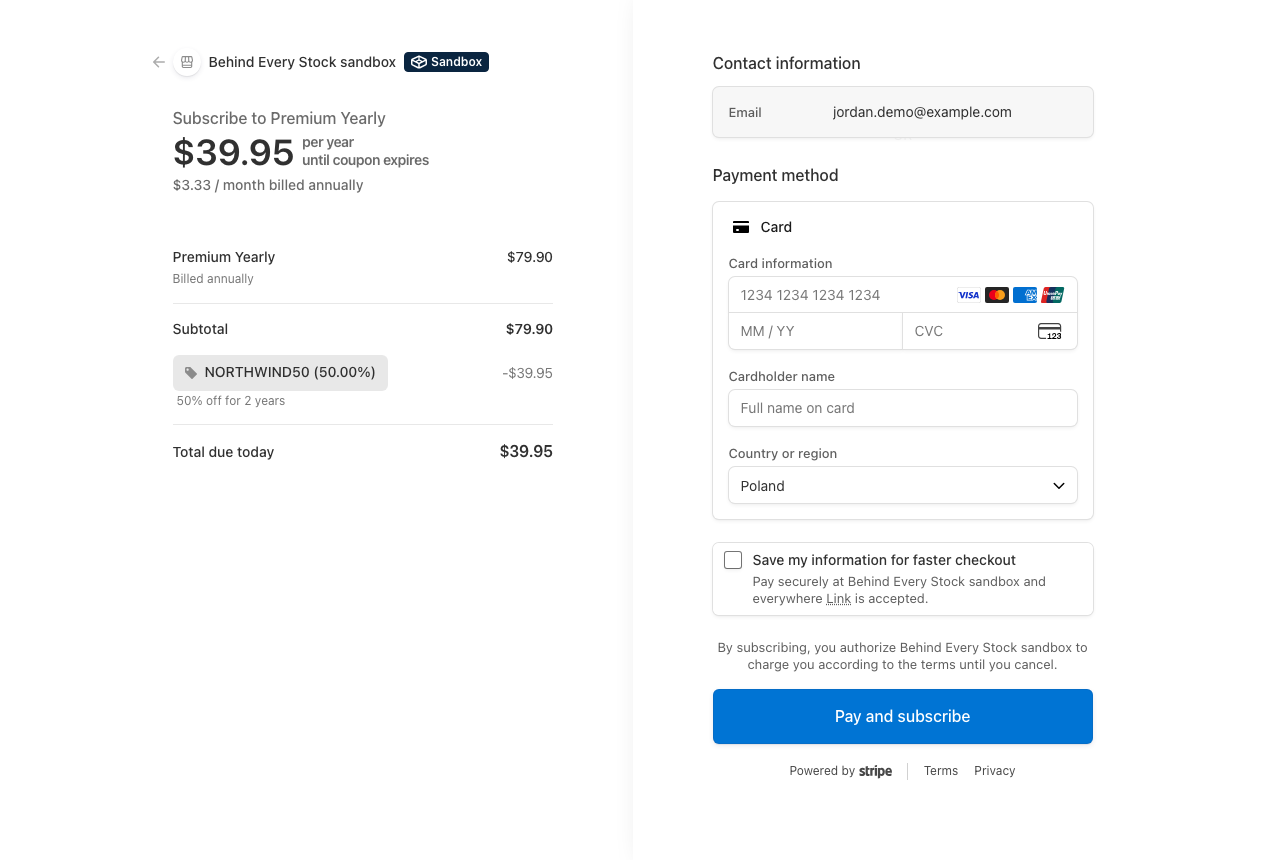
Our secure payment page (Stripe) already shows the discount line and the reduced total.
The discount on the payment page (Stripe test mode).
7
After payment
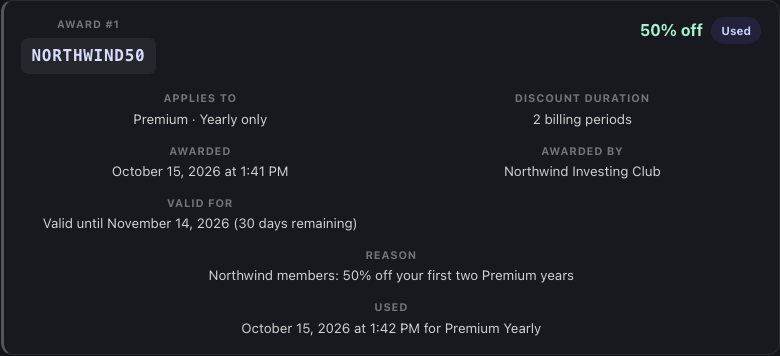
The discount is marked Used with the plan it was used on. If the offer covers more than one billing period, your renewals are discounted automatically too — no action needed.
Used — and still applied to the promised renewals.
Every option of a promo code
Option
What it does
Example
Code
The text people use. Unique, 3–50 characters, capital letters/numbers/“-”/“_”.
NORTHWIND50
Partner
Who the code belongs to and who earns the commission.
Northwind Investing Club
Customer discount
Percentage off each discounted payment (0–100%). 0% makes it a tracking-only code: sign-ups still count and still earn you commission, but customers get no discount.
50%
Eligible plans
Premium, Max, or any paid plan.
Premium
Eligible billing interval
Monthly only, yearly only, or both.
Yearly only
Discounted billing periods
How many payments in a row get the discount. 1 = first payment only. 2 on a yearly plan = the first year and the first renewal.
2
Award validity (days)
How long after signing up the customer has to start their first eligible payment. Empty = no limit.
30 days
Remaining uses
How many more sign-ups can claim the code. Each sign-up uses one. Empty = unlimited.
200
Code expires
After this date nobody new can sign up with the code, and saved discounts that have not been used yet expire on the same date.
31 Dec
Active
Switch the code off at any time. Existing customers keep their saved discounts.
On
Your commission
Percentage of what the customer actually pays (after discount) that you earn, on every payment of that customer.
30%
Where the money goes — and how to track it
Customer paysList price − their discount. That paid amount is the base for your commission.
Commission line createdYour percentage of the paid amount, rounded to the cent, appears in your dashboard right away.
Waiting periodUntil the paid period has run: 1 month for monthly plans, 1 year for yearly plans. Covers refunds and withdrawals.
Ready for payoutConfirmed and queued for your next transfer.
Paid outOur team transfers the money and the line shows the payout date.
Your dashboard adds every commission up per month.
Worked example — Premium Yearly, 50% off for 2 years, 30% commission
Payment
List price
Customer discount
Customer pays
Your commission
Payable after
Year 1 (first payment)
$79.90
−$39.95
$39.95
$11.99
end of year 1
Year 2 (renewal)
$79.90
−$39.95
$39.95
$11.99
end of year 2
Year 3 (renewal)
$79.90
none
$79.90
$23.97
end of year 3
Commission over 3 years from one customer
$47.95
Refunds
If a customer withdraws within 14 days or is refunded, the line shows Refunded — no commission. A partial refund lowers the commission to your percentage of what the customer kept.
Commission percentage
The percentage agreed on your code applies to every payment. Larger single payments can carry a small bonus; the exact percentage used is printed on every line.
Currencies
Each line is in the currency the customer paid. Your dashboard totals use the currency most of your customers pay in.
Rules & edge cases
Only at sign-up, only by link
A code is attached when the account is created from a link that carries it. The normal sign-up page has no promo field, and codes cannot be added later.
One claim per account
The same code cannot be claimed twice by one account. Each claim uses one of the code's remaining uses.
One discount per payment
If an account holds several discounts, the oldest eligible one is used first. Discounts are never stacked.
Abandoned checkout
Leaving the payment page does not lose the discount: starting a new checkout cancels the old payment page and moves the discount to the new one.
Upgrades
An unused discount for the target plan applies to the upgrade payment. A running multi-period discount carries over when the new plan is also covered.
Partner pauses
If a partnership is paused, the code stops accepting new sign-ups. Commissions already earned are kept.
Privacy
Partners see anonymous customer references and amounts only — never names, e-mails or account details.
I already have an account. Can I still use a partner's code?
No. Codes are attached only when an account is created through a partner's link.
My discount says Expired. What happened?
Some codes give you a limited time (for example 30 days) to start your first eligible payment. After that the saved discount expires.
As a partner, why is a commission still in the waiting period?
Commissions become payable once the customer's paid period has run — one month for monthly plans, one year for yearly plans — so refunds and withdrawals never need to be reclaimed from you.
As a partner, my dashboard says the account is not linked.
Sign in with the exact e-mail address our partner team registered for you, and make sure it is verified. If you use a different address, ask us to update it.
Can partners see who signed up?
No. Partners see an anonymous reference, the date, the plan and the amounts — nothing that identifies the customer.
Want your own promo code?
Write to us and tell us a little about your audience (newsletter, channel, community or website). We will set up your code and your partner dashboard together with you.
Deliver and maintain our services, protect against spam, fraud and abuse
Measure audience engagement and site statistics to understand how our services are used (Google Analytics)
Remember your quiz progress and tailor the knowledge base to your skill level (optional)
You can accept all cookies or configure your preferences. You can change them at any time via the "Manage Cookies" link in the footer.
Manage cookie preferences
Necessary cookiesAlways active
Required for the website to function. These cannot be disabled.
Cookie
Purpose
Duration
PHPSESSID
Session identifier for login, security tokens, and site functionality
Session
cookie_consent
Stores your cookie preferences
1 year
Analytics cookies
Help us understand how visitors interact with our website using Google Analytics. These cookies collect information anonymously.
Cookie
Purpose
Duration
_ga
Distinguishes unique visitors (Google Analytics)
2 years
_ga_*
Maintains session state (Google Analytics)
2 years
Personalization cookies
Remember your quiz progress and work out your investing level so we can recommend knowledge-base articles and the right reading depth for you. Stored only on your device.
Cookie
Purpose
Duration
bes_user_level
Your quiz-derived investing level, used to tailor content